AI Scripture Detection
AI Scripture Detection
WayPresenter uses advanced AI to listen to your pastor or speaker in real time and automatically detect Bible verse references. When a verse is mentioned, it is queued for display on screen — no operator intervention required.
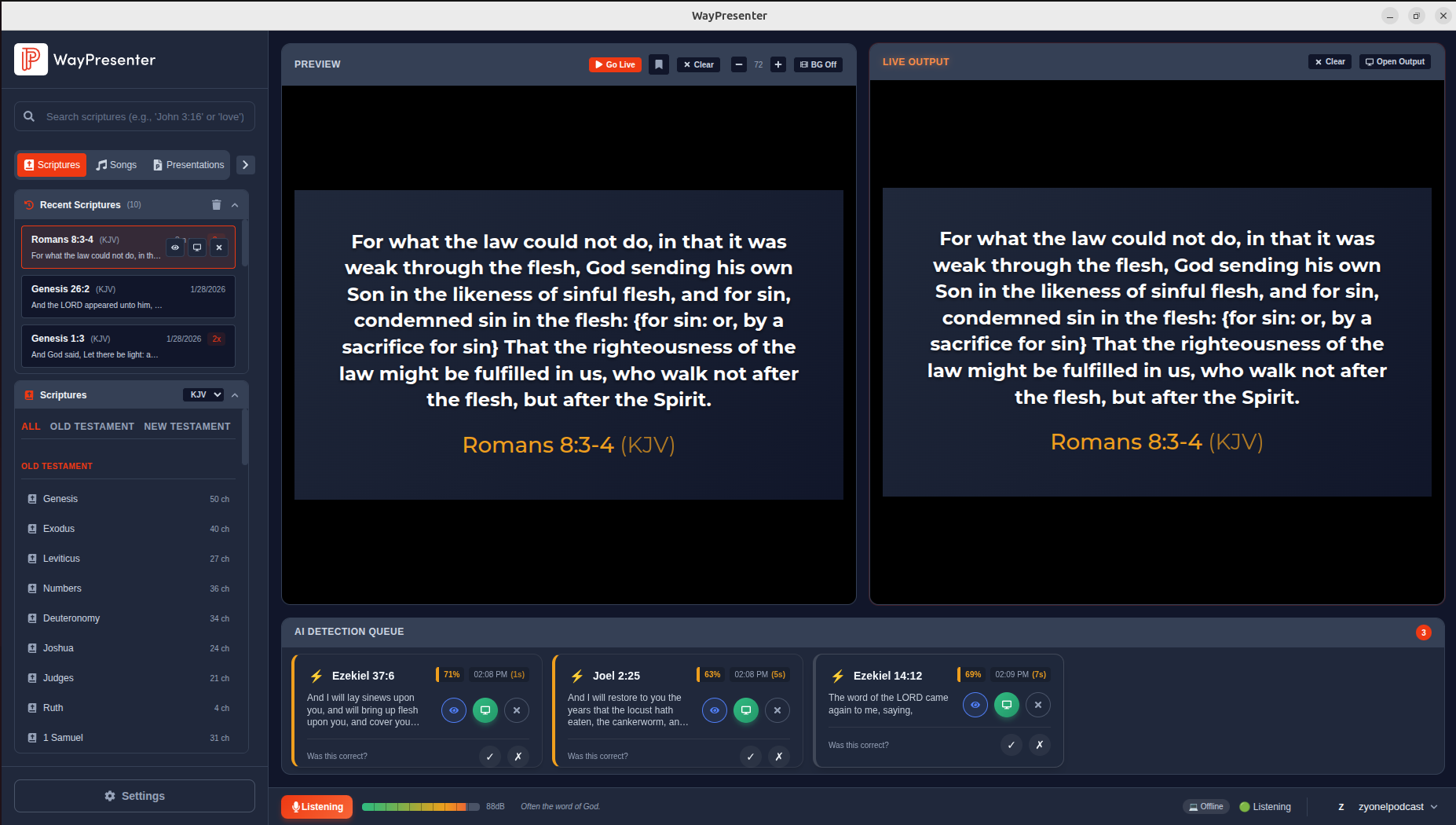
How It Works
WayPresenter runs a local speech recognition engine based on OpenAI's Whisper model. The audio from your selected input device is continuously transcribed, and a specialized scripture-matching algorithm scans the transcript for verse references.
When a reference like "John 3:16" or "turn to Romans chapter eight" is detected, WayPresenter looks up the passage in your configured Bible translation and prepares it for display. The entire pipeline runs locally on your computer, meaning no audio ever leaves the device.
The Detection Pipeline
- Audio is captured from your selected microphone or audio interface.
- The Whisper model transcribes the speech to text in real time.
- The scripture matcher identifies verse references in the transcript.
- Matched verses are looked up in your active Bible translation.
- The verse is placed in the detection queue, ready for display.
Enabling AI Detection
To turn on AI scripture detection:
- Open Settings from the main menu.
- Navigate to the AI Detection tab.
- Toggle Enable Scripture Detection to on.
- Select your audio input device from the dropdown.
- Click Test Audio to verify the microphone is picking up sound.
- Click Save to apply your settings.
Once enabled, you will see a small indicator in the toolbar showing that the AI engine is actively listening. A waveform animation confirms that audio is being received.
The Detection Queue
Detected verses do not appear on screen immediately. Instead, they are placed into a detection queue that the operator can review. This gives your team the opportunity to confirm each verse before it goes live.
- Auto-display mode: Verses are shown automatically after a short delay (configurable from 1 to 10 seconds). Best for experienced setups with reliable audio.
- Manual approval mode: Each detected verse waits in the queue until the operator clicks to display it. Recommended when starting out.
- Queue history: Previously detected verses remain in the queue log for the duration of the session so you can return to a passage if needed.

Confidence Scoring
Every detected verse receives a confidence score indicating how certain the AI is about the match.
| Score Range | Rating | Meaning |
|---|---|---|
| 95 - 100% | Excellent | Very high certainty. Safe for auto-display. |
| 85 - 94% | Good | High certainty. Reliable in most situations. |
| 75 - 84% | Fair | Moderate certainty. Operator review advised. |
| Below 75% | Review | Low certainty. Manual verification needed. |
You can set a minimum confidence threshold in Settings. Verses below your threshold will still appear in the queue but will be flagged for review rather than auto-displayed.
Improving Accuracy Over Time
WayPresenter includes a feedback mechanism that helps refine detection accuracy for your specific environment.
- Confirm correct detections: When a verse is correctly identified, click the checkmark. This reinforces the match pattern.
- Correct wrong detections: If the AI misidentifies a verse, click the edit icon and select the correct reference. This teaches the system about common misheard phrases in your setup.
- Dismiss false positives: If something is detected that is not a verse reference at all, dismiss it. This reduces similar false triggers in the future.
Over several services, the system builds a profile tuned to your speaker's voice, accent, and the acoustics of your room.
Privacy and Local Processing
All audio processing happens entirely on your local machine. WayPresenter does not send audio, transcriptions, or any data to external servers. The Whisper model runs locally, and all feedback data is stored in your local application database.
This design means you can use AI detection confidently in any setting without concerns about data leaving your network.
Configuring Sensitivity Settings
Fine-tune how aggressively the AI listens for verse references under Settings > AI Detection > Sensitivity.
- Detection sensitivity: Controls how eagerly the system flags potential verse references. Higher sensitivity catches more references but may produce more false positives. Lower sensitivity is more conservative.
- Minimum confidence threshold: Sets the lowest confidence score a detection must reach to enter the queue. Default is 75%.
- Context window: Adjusts how much surrounding speech the AI considers when identifying a reference. A longer window helps with references like "chapter eight, verses one through four" where the book name was mentioned earlier.
- Cooldown period: Prevents the same verse from being detected repeatedly within a set time window. Default is 30 seconds.
Experiment with these settings during a rehearsal or sound check to find the combination that works best for your environment.