First Launch Walkthrough
The Onboarding Wizard
When you first launch WayPresenter, the onboarding wizard guides you through essential setup steps. This typically takes about 5-10 minutes.
Step 1: Select Your Language
Choose your preferred interface language. WayPresenter currently supports English, Spanish, Portuguese, and Korean.
Step 2: Configure Audio Input
The onboarding wizard will detect available audio devices on your system. Select the audio source you want to use for AI scripture detection:
- Soundboard feed (recommended) — Direct connection from your church's sound system
- USB microphone — A microphone positioned near the pulpit
- System audio — Captures all audio playing on your computer
For detailed audio setup, see Configuring Audio Input.
Step 3: Choose Bible Translations
Select which Bible translations you'd like to have available. KJV is included by default. Additional translations may require separate download.
Available Translations
- KJV (King James Version) — Included
- NIV (New International Version)
- ESV (English Standard Version)
- NLT (New Living Translation)
- NASB (New American Standard Bible)
Step 4: Set Up Display Output
Configure your presentation display:
- Connect your projector or secondary monitor
- WayPresenter will detect available displays
- Select which display to use for the audience view
- Choose your default theme and font size
Step 5: Import Existing Content
If you're migrating from another presentation software, you can import your content now:
- EasyWorship — Import songs, presentations, and schedules
- ProPresenter — Import songs and media
- OpenLP — Import songs and service plans
- Plain text files — Import song lyrics from .txt files
Completing Setup
Once you finish the wizard, WayPresenter opens to the main interface. You're ready to start creating presentations and using AI scripture detection.
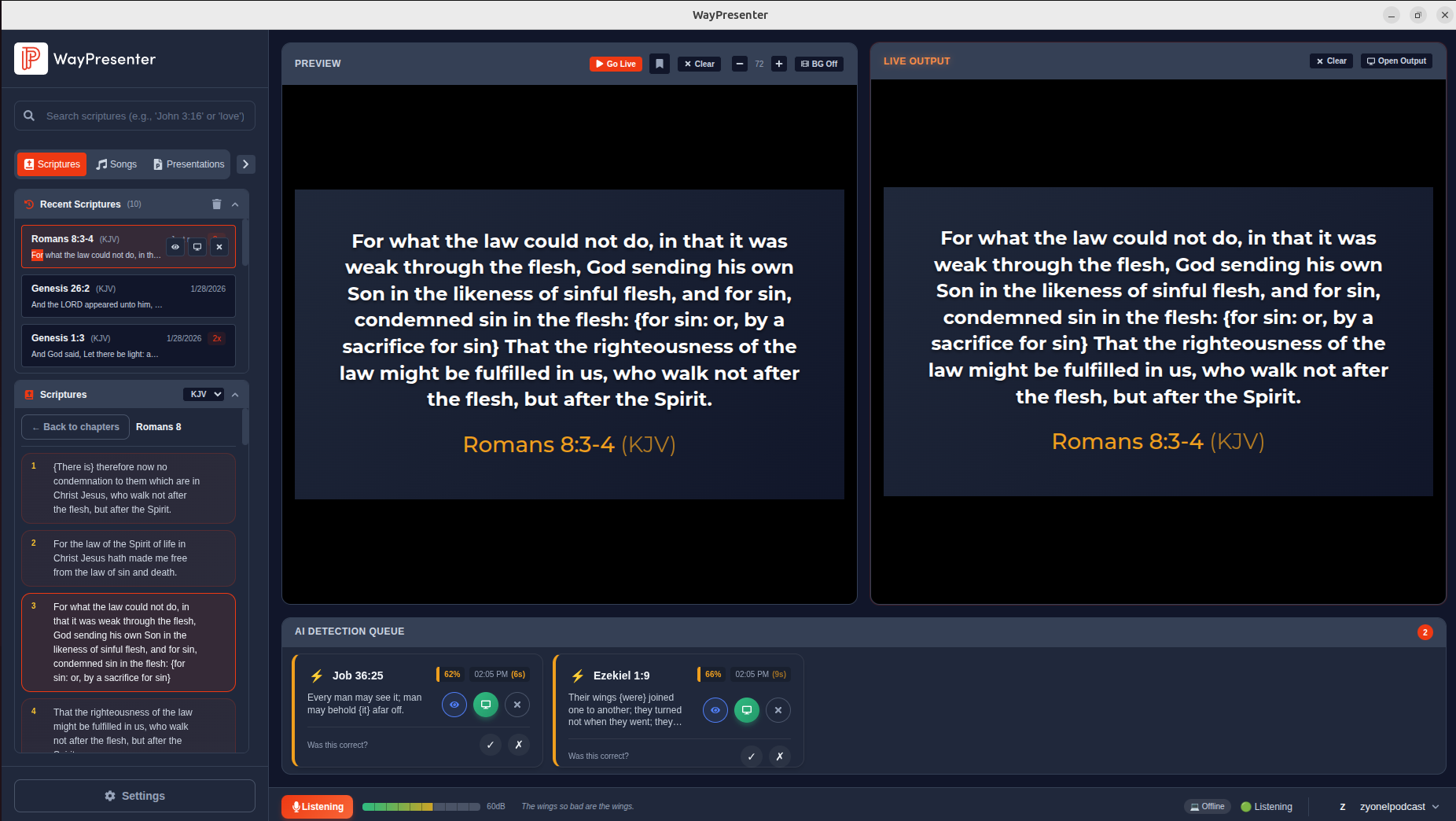
Understanding the Interface
- Left Panel: Content library (songs, scriptures, media)
- Center: Preview and live output monitors
- Right Panel: AI Detection Queue
- Bottom Bar: Audio level meter and controls
Next Steps
- Configure Audio Input for best AI detection results
- Add Your First Song to the library
- Display Scriptures during a service